The 6 Best Free Calming Sounds Apps for Nervous System Regulation



Most of us already know that sitting by a stream or waking up to birdsong just feels different. Turns out, the science backs that up. Researchers who analyzed decades of studies on sound and stress found that music, nature sounds, and even calming voices measurably lower cortisol, heart rate, and blood pressure.
Basically, sound is a surprisingly powerful and underrated stress-relief tool, especially if you struggle with poor sleep and rely on sleep music to unwind at night. And you don't need to find a forest. Here are six apps that have everything from relaxing music and soothing sounds to ambient background noise.
The Top Relaxing Sounds Apps For White Noise and Meditation Music
| Name | Platforms supported | # of Sounds in Free version |
| Sleepa | iOS, Android | ~30 core sounds |
| Atmosphere | iOS, Android | 70+ ambient sounds |
| Coffitivity | Web (browser only) | 9 tracks |
| Moodist | Web / PWA (Add to Home Screen) | 84 sounds |
| Rainy Cafe | Web | 2 sounds (Rain, Cafe) |
| Dark Noise | iOS | 8 sounds |
Now for a deeper review, so you know what you’re actually getting when compared to other similar apps:
1. Sleepa
If you’re the type of person who needs background noise to drift off, Sleepa is your go-to. It’s basically a DIY soundboard for your bedroom. Instead of just picking one track, you can mix a bunch of them together, like layering a thunderstorm over a crackling fire or a distant train hum, and adjust the volume of each until it sounds just right.
The best part about the free version is that you get around 30 soundscapes to play with and a timer that fades everything out so it doesn't stay on all night. It also works completely offline, which is perfect if you’re traveling or just want to keep your phone on Airplane Mode to avoid late-night pings after bedtime.
Sleepa Pros
- You don't have to pay to blend up to 8 sounds at once; the "mixer" is fully available for free
- Since the sounds are stored on your phone, you can use them anywhere without burning through data
- It’s reliable in the background, and won't cut out if you switch to another app or lock your screen
Things to Consider With Sleepa
- The free version has some pretty loud pop-up ads that can definitely ruin a sleepy mood
- Some of the cooler sounds and "Sound Journeys" are locked behind a subscription
Platforms Supported
- iOS: App Store Link
- Android: Google Play Store Link
2. Atmosphere
If you want an app that lets you build your own "vibe" from scratch, Atmosphere is a good option. It organizes sounds into different environments like Forest, City, and even a "Home" category with sounds like a washing machine or fan. It’s perfect for people who find standard white noise a bit too boring.
You also get some scientific options like binaural beats and isochronic tones, which are frequencies meant to help your brain shift into a deeper state of relaxation and can be helpful if you have anxiety.
Atmosphere Pros
- Unlike many other apps, Atmosphere gives you almost all of its sounds for free
- You can add your own MP3 files from your phone and mix them in with the app’s built-in sounds
- You can create a list of favorite sound mixes and save them to your playlist
Things to Consider With Atmosphere
- Because the app allows you to layer so many high-quality sounds at once, it can be a bit hard on your battery
- There are banner ads and the occasional pop-up, though you can remove them for a one-time fee of around $4.99
Platforms Supported
- iOS: App Store Link
- Android: Google Play Store Link
3. Coffitivity
If you’ve ever found that you work better in a buzzing cafe than a silent library, Coffitivity is exactly what you need. It’s a niche app that recreates the ambient hum of a coffee shop. It’s based on the idea that a little bit of background noise actually helps you focus better on creative tasks than total silence.
The free version gives you 9 solid tracks to start with, such as "Morning Murmur" and "University Undertones." However, Coffitivity can only be used via the browser as they don’t have any mobile apps.
Coffitivity Pros
- No complicated settings or EQ sliders; you just pick a cafe "vibe" and get to work
- You don't need to create an account to start listening to the basic tracks
- Specifically tuned to the 70-decibel range, which is proven to help with creative focus
Things to Consider With Coffitivity
- You have to run it through your mobile browser
- The "premium" cafes (like the Parisian cafe) are locked behind a yearly fee
Platforms Supported
- Web: Coffitivity.com
4. Moodist
If you’re tired of "freemium" apps that lock the best sounds behind a subscription, Moodist is for you. It is a completely free, open-source project that offers a massive library of 84 sounds. It also packs in extra tools like a Pomodoro timer and a notepad, making it a full-on productivity hub.
Because it’s a Progressive Web App (PWA), you won't find it by searching the App Store or Google Play. Instead, you just visit the site on your phone and "Add to Home Screen." It then lives on your phone like a regular app and works offline.
Moodist Pros
- It’s 100% free and open source
- You get full privacy — no tracking, no ads, and no data collection
- Includes a "Flowmodoro" timer and a simple checklist so you can work and listen in one place
Things to Consider With Moodist
- You have to manually add it to your home screen from your browser, which might be a bit confusing for less tech-savvy users
Platforms supported
- Web / PWA: Moodist.app
5. Rainy Cafe
If you want the simplest possible version of the "cafe focus" science, Rainy Cafe is as minimal as it gets. It’s not an app per se. Instead, it’s a single-page website that does exactly what the name suggests.
It features two toggle switches: one for "Cafe" and one for "Rain." You can turn them both on, adjust the volume sliders to find your perfect balance, and that’s it. It’s the "zero-friction" option for people who just want to open a browser tab and start working immediately.
Rainy Cafe Pros
- You don't have to download anything or sign up for an account; it just works in your browser
- Because it’s a simple web page, it’s often lighter on your device’s battery and RAM than a heavy mobile app
Things to Consider With Rainy Cafe
- You need an active internet connection to load the page and play the sounds
- You only get two sounds (Rain and Cafe)
Platforms Supported
- Web: RainyCafe.com
6. Dark Noise
If you appreciate good design as much as good sound for stress relief, Dark Noise is probably the sleekest app in this category. It uses high-quality stereo sounds like a Spaceship Engine or Heavy Rain, and pairs them with minimalist, animated icons that look great on your screen.
You also get the "Sleep Timer" and full support for Siri and Shortcuts. This means you can actually set up your phone so that saying "Hey Siri, it's bedtime" automatically starts your favorite rain sound without you even touching the screen.
Dark Noise Pros
- Unlike many free apps, this one doesn't bombard you with loud video ads
- The sounds are professionally mastered, so you won't hear those annoying loops where the audio resets
- It supports almost every Apple feature, from Lock Screen widgets to Siri Shortcuts, even in the free tier
Things to Consider With Dark Noise
- It’s not available on the web or Android devices
- You only get 8 sounds for free. To unlock the other 50+ sounds and the mixer, you'll need a Pro subscription
Platforms Supported
- iOS: App Store Link
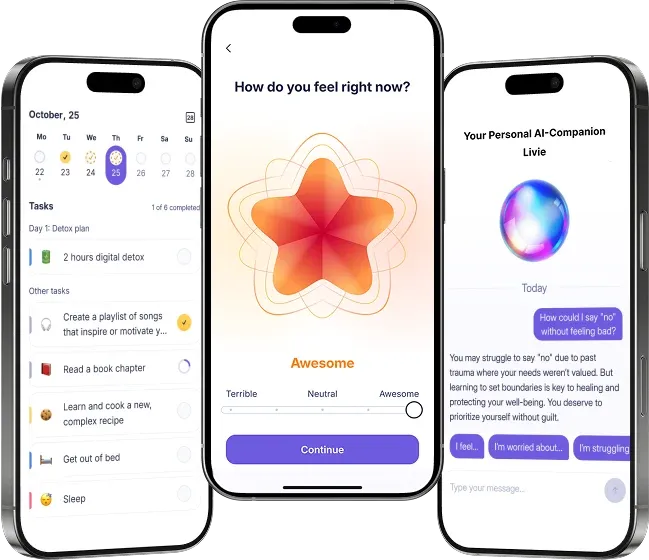
Get Relaxing Music and Improve Your Overall Well-being With Liven
The sound apps are great for a quick sound fix, but if you’re looking for more than just a background loop, Liven is a holistic well-being toolkit that helps you understand why you’re feeling restless in the first place.
It includes a high-quality sound library with everything from binaural beats to lo-fi, but that’s just one piece of the puzzle. The core of Liven is about self-observability. It pairs those calming sounds with a mood tracker, a guided journal, and research-informed mental tests.
Instead of just filtering out your environment, you’re using these tools to spot emotional patterns and triggers over time. While it’s a paid app, it can be helpful if you want to move past coping and start actively regulating your nervous system.
References
- Saskovets, M., Saponkova, I., & Liang, Z. (2025). Effects of sound interventions on the mental stress response in adults: Scoping review. JMIR Mental Health, 12, e69120.
- Nakajima, Y., Tanaka, N., Mima, T., & Izumi, S. (2016). Stress recovery effects of high- and low-frequency amplified music on heart rate variability. Behavioural Neurology, 2016, Article 5965894.
FAQ: Calming Sounds Apps
What is the best free calming sounds app right now?
Can relaxing sounds really help reduce stress and anxiety?
What’s the difference between white noise, brown noise, and pink noise?
Can I create and mix my own sounds?
Do free calming sound apps have ads?
What’s the best calming sounds app for sleep versus focus?
Do I need a premium subscription for more sounds and features?