How to Choose the Right (Anti) Procrastination Planner for You?



If you’ve ever felt like you’ve forgotten something, and this something tends to pile up the more you think about it, you’re not alone. Studies have found that we often procrastinate when a task feels boring or stressful, when it’s easy to put off, or when we lack confidence in our ability to do it well.
If we add a cognitive overload and a need to remember all of that on top, it becomes challenging to beat procrastination. Your weekly planner can be a go-to place for main contact resources, deadline tracking, and even motivation. When considering the type of planner to use, we often ask ourselves: "Should we opt for a digital system or a paper-based one?"
There’s no single “best” type of planner — it all depends on how your brain works. Some people stay more focused with a tactile, pen-and-paper experience, while others thrive when their tools sync across devices and send reminders.
This guide will explore some life-changing planners to boost productivity and explain how to create or customize your own weekly planner to stop procrastinating and start achieving your goals.
Key Learnings
- Procrastination planners are best at reducing mental overload.
- Different planner styles cater to various procrastination patterns, ranging from anti-planners and ADHD-friendly layouts to energy-based lists, funnel planning, and brain dumps.
- A DIY planner can be highly effective if you sync it with your habits: start simple, focus on function over aesthetics, review it regularly, and leave space for reflection and motivation.
A Digital Planner List
Research indicates that self-management anti-procrastination apps help people reduce their procrastination and become more accountable. With a flexible on-the-go system that sends reminders and allows us to access our plans from any device, we can minimize distractions and focus on our schedules.
Liven: More Than Just a To-Do List
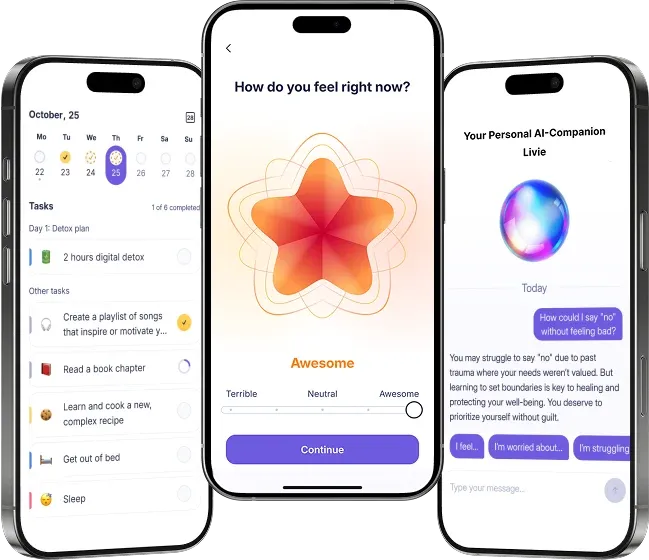
A self-discovery companion that addresses the patterns behind our procrastination and gives insights about what motivates you, Liven taps into the nature of user procrastination. Users who want to understand how they think and beat procrastination in the long term may find Liven’s anti-planner feature refreshing.
Main Features:
- Habit Builder. Habit Builder from Liven is the cornerstone of Liven’s approach to procrastination management. This planner reminds users about daily tasks and routines to practice, helps them set and achieve their own goals, and tracks their progress.
- Mood tracker. Mood tracking enables users to review their behavioral patterns and examine the emotional tendencies that guide their motivations.
- Guided journaling. When users write down their feelings and explore what stops them from being productive, they become more introspective.
- Bite-sized courses. Liven’s easy and quick lessons support psychoeducation and provide relevant strategies for different situations.
- Detailed mental health tests (including a procrastination scale). You can track your procrastination with regular assessments.
- An AI companion, Livie. Want to vent about the approaching deadlines and share your worries? Livie has you covered.
Pricing: Starts from $7.99 per week.
Notion: Organizing Your Entire Life
Notion offers a flexible workspace for individuals who seek a planning tool that accommodates their unique thinking style. With pages, templates, and databases, Notion can be a weekly planner with a structure that supports your goals.
Main Features:
- Custom pages and templates. Users can create daily planners, habit trackers, or reflection journals that align with their workflow.
- Calendar and board views. Notion offers various visualization formats to enhance understanding of daily appointments, calls, and assignments for preparation.
- Databases. With this tool, users can organize their materials and documents in one place and return to them when needed.
Pricing: Notion’s individual plan is free.
Todoist: An Elegant Daily Planner
Todoist is designed for people who prefer a clean, distraction-free, classic task manager. If you need a system that divides your plans into sections for easy viewing and switching between categories, Todoist is a good option to consider as a weekly planner.
Main Features:
- Smart task list. Todoist allows users to organize tasks by priority and manage them with ease in just a few clicks.
- Timely reminders. Users stay on top of their productivity journey due to reminders about deadlines and commitments.
- Labels and filters. You can group tasks by mood, energy, or context to make starting easier.
Pricing: Free option, premium starts from $4/month.
Goodnotes: Your Collaborative Weekly Planner
Goodnotes is an app that lets you preserve the paper feel while still benefiting from digital tools. This app is for thinkers who prioritize visual thinking and sharing information with others.
Main Features:
- Handwritten notes. Users can capture thoughts naturally as they write or draw and stay engaged with the planning process.
- Stickers and visual tools. With Goodnotes, planning is easy and enjoyable, plus, it helps you beat procrastination by adjusting your format.
- Reusable templates. Just because it looks like paper doesn't mean it should be like one; users can reuse the relevant templates to enhance their planning system.
Pricing: Free to try, individual premium starts from $11.99/year.
Paper Planner Options for Those Who Love the Tangibility of Paper
If you're someone who’d rather keep your planner in your bag than look it up online, here are a few options we have reviewed.
- Hobonichi Techo 2026. Already known for its impressive planner and stationery solutions, Hobonichi comes with another elegant solution for 2026.
- Weekly 2026 Planner | Koi Pond. Straight from Passion Planner, this bestseller is a good fit for customers who want a year-long option with weekly schedule spreads.
- A5 Horizontal Full Year | 2026 Common Planner. Made by Sterling Ink, this variant offers a minimalist weekly planner that prioritizes effectiveness over extra flair.
- 2026 Daily Planner From Sprouted Planner. If you’re a fan of a more detailed weekly planner, Daily Planners (there are two for a year, bought together) from Sprouted Planner can help you beat procrastination and set goals that reflect your values.
- 2026 Goal-Setting + Weekly Planner. This planner, made by MäksēLife, integrates goal-setting into the planner itself.
- Spiral Bound Organizer | Black Ink Style. The Planner Pad features a helpful design that mimics the way the human brain works, progressing from larger goals to more specific ones.
- Fast Brain | The Complete Set. This weekly planner from Creator’s Friend consists of 12 monthly planners in one set.
- Legend of Istoria. At the top of the creative list are anti-planners from The Hero’s Journal. Offering a break from a traditional approach to hard work and productivity, it utilizes a gamified, story-driven perspective.
- Dreambook + Planner. Similar to a few of the above, the Dragontree anti-planner combines schedule review and goal mapping to help you make smarter choices and align your daily actions with your life goals.
DIY Anti-Planner to Beat Procrastination
A DIY planner can be a perfect option if you’ve never found a pre-made layout that actually works for your brain. Additionally, it can be cost-effective, allowing you to select the design you like and the tools that are most helpful to you. Here, we’ll suggest a few tips for people who find it daunting to beat procrastination on their own.
1. A Brain Dump Section
Dedicating a relatively large (⅕ of a planner) to this section is necessary because this section is not structured. A no-filter zone for everything swirling in your head — tasks, reminders, ideas, worries, errands. This is your mental inbox. Whenever you feel stuck or overwhelmed with managing tasks, you can start here. You can draw, sketch, schedule, or write down what has been stressing you out.
2. Funnel Planning Spreads
The funnel method proposed by Planner Pad can be easily adopted for building your own weekly planner. If you cannot keep track of all the things productivity requires from you, you can beat procrastination by narrowing down your goals. Introducing a monthly two-page spread where the tasks are being moved through funnels from monthly to weekly to daily helps keep track of long-term goals and intimidating projects.
3. Detailed Daily Pages
When you have a lot of tasks to do in 24 hours, a small box for the day won’t be enough. It can be more efficient to allocate at least half the page to ongoing tasks, with the option to time-block the day if it’s particularly busy. Moreover, you can try adding a box for important habits, such as drinking water or exercising, and including one “must-do” if there’s anything you feel is the core priority. Then, you can introduce a few optional “nice-to-do” items.
4. Habit Tracker
If you have several habits that you try to introduce into your life and keep consistent, having an additional page with a habit tracker can help you see how well you’re doing. Many people enjoy color-coding days based on whether they met their goal or not. Some simply prefer leaving checkboxes to keep things easy. Check out these habit tracker spreads for some ideas.
5. Backlog Task List
We all have things we didn’t get to, despite every promise. We keep worrying about them, unable to get a break and move forward, because the nagging feeling never seems to vanish. This list can be particularly extensive for professionals or students who have struggled with procrastination for a long time.
But if we keep things organized and put the delayed tasks on our backlog, we can keep track of them and cross them out once we’re done. It removes the pressure to do everything right now while still keeping important things visible.
Divide your backlog into categories like:
- Home
- Work
- Admin
- Self
- Life maintenance.
Once a week, pull one or two items into your active schedule.
6. Important Documents Pocket or Envelope
Having a small pocket or an envelope attached to your weekly planner helps you keep all those papers you need but keep losing in one place. This is where you could place:
- bills
- forms to fill out
- medical documents
- phone numbers
- receipts
- contracts
- “things you can’t lose.”
It reduces chaos and helps avoid procrastination caused by missing papers or by searching for things at the last minute. Once you take this paper out and complete your planned task, you can remove it from the stack permanently.
7. Energy-Based Task List
Another idea for people struggling to recover from burnout is dividing tasks by the energy they require. The better you understand your procrastination cycle and how your mind works, the easier it is to beat procrastination. For example, you could categorize them as high-energy, medium-energy, and low-energy. This helps you take action even on days when you're tired or stressed. Sometimes, individuals divide their week into high- and low-energy days, rotating their productivity levels.
8. Monthly Calendar Reflection Pages
It’s a good idea to check in with yourself and how well you’re doing from time to time. Add 1-2 pages after each month and include prompts like:
- What worked this month?
- What strategies supported me?
- Has the quality of my productivity changed at all?
You can also explore the roots of your motivation, as research shows it often affects our productivity. At the end of the year, you can read through these pages and observe how your priorities and challenges shifted from day to day.
9. Focus Timer Spread (Pomodoro Log)
The Pomodoro Technique is a well-known approach to focusing on work that alternates between periods of focused work and brief breaks. At the end of the planner, you can assign a separate section to the focus session pages. Seeing visual progress builds momentum and reduces the urge to procrastinate “because nothing’s happening.”
Planner Format Ideas: When to Use Each One?
As much as we all love aesthetic planners with lots of space, different journals work for different people.
- A small, pocket-sized planner. Getting inspiration from planners like this from Rifle Paper Co., we can create tiny journals that won’t take up much space, wherever we go and whatever we wear.
- A two-planner system. This format features two planners: a larger one at home and a smaller one that you keep with you.
- A wall planner. Creating a large wall planner like this one, with small boxes for each day of the year, helps people see their entire year at a glance, including dates, plans, and deadlines.
- A digital planner + paper one. Many people use digital tools (e.g., Liven, Notion, reminders app) for alerts, and a paper planner for structure and writing.
Make Your Own System
Procrastination often appears in planners as well. These simple principles can help you organize your planner without getting stuck in the details.
- Focus on efficiency, not aesthetics.
It’s easy to get distracted by the visually appealing planners on social media. But over-decorating or obsessing over design can actually fuel procrastination. Cindy Guentert-Baldo, a YouTube creator on planning, says we often lose track of time, making our planners look perfect instead of using them to stay on track. - Start simple and affordable.
Have you ever bought an expensive journal and forgotten about it a week later? It takes time to build a planning habit. Start with a simple, easy-to-follow setup that doesn’t add stress. - Set realistic goals.
Just because there's space on paper doesn’t mean there’s enough time. Align your plans with your energy and schedule. Overloading your planner can lead to failure and reinforce procrastination. - Set time to update.
To keep your planner effective, schedule daily check-ins, even if it’s just for 3-5 minutes. A set routine will help you stick with it. - Leave room for reflection.
Keep it simple: a couple of lines each day to reflect. This will help you understand what’s working and tackle procrastination patterns.
Ultimately, consistency matters. The planner alone won’t do the work, it’s up to you to take the first steps. Be patient with yourself, stay curious, and let the process teach you focus and accountability.
References
- Caparos, E. S., G. Dioquino, J. P., S. Bathan, M. J., Falad, J., Gabriel, C. E., & Prudente, R. S. (2025). Improving student organization: Designing a Digital Planner app for college students. International Journal of Innovative Science and Research Technology, 1810–1817. https://doi.org/10.38124/ijisrt/25may764
- Guentert-Baldo, C. (2020). Planning As Procrastination (I’m Calling Myself OUT). YouTube. https://www.youtube.com/watch?v=pxpM0sPNnjA
- Lee, E. (2005). The relationship of motivation and flow experience to academic procrastination in university students. The Journal of Genetic Psychology, 166(1), 5–15. https://doi.org/10.3200/gntp.166.1.5-15
- Samokhval, V. (2025a, April 15). How to stop procrastinating: 10 proven strategies to take action today. The Liven. https://theliven.com/blog/wellbeing/procrastination/how-to-stop-procrastinating-understanding-the-cycle-and-10-effective-strategies
- Samokhval, V. (2025b, May 2). How to stop procrastinating and start studying: Effective strategies. The Liven. https://theliven.com/blog/wellbeing/procrastination/how-to-stop-procrastinating-and-start-studying-as-college-student
- Steel, P. (2007). The nature of procrastination: A meta-analytic and theoretical review of quintessential self-regulatory failure. Psychological Bulletin, 133(1), 65–94. https://doi.org/10.1037/0033-2909.133.1.65
- Zhao, S., Sahebi, S., & Feyzi Behnagh, R. (2023). Curb your procrastination: A study of academic procrastination behaviors vs. a planning and Time Management app. Proceedings of the 31st ACM Conference on User Modeling, Adaptation and Personalization, 124–134. https://doi.org/10.1145/3565472.3592953
FAQ: How to Choose the Right (Anti) Procrastination Planner for You?
What is a weekly planner, and how can it help me beat procrastination?
How does a weekly planner improve completing tasks when a regular to-do list doesn’t work?
Should I use a daily planner, weekly planner, or monthly calendar?
Is a digital planner better than a paper one?
What’s an anti-planner, and why do people with ADHD brains sometimes prefer it?
Can a weekly planner really help me stay organized in my entire life?
What should I include if I want to create my own weekly planner?
Are there any entertaining ways to make planning less stressful?