What Are the Best Apps for Journaling to Help You Reflect and Grow?



Do you ever feel stuck in an overthinking loop or overwhelmed by racing thoughts? Journaling can help you clear your mind, make sense of your emotions, and slow down. But building a consistent habit isn’t always easy, especially when life gets busy or facing a blank page feels intimidating.
Digital journaling apps make this process easier and more accessible. In this article, we'll explore the best apps for journaling in 2026, from classic journals to mood-aware reflection tools, so you can pick the one that best suits your personal needs!
Key Learnings
- Regular journaling, even in short or guided formats, supports self-awareness, emotional clarity, and long-term well-being.
- Pick an app that fits your lifestyle and journaling goals, whether it’s minimalist, AI-guided, or focused on mood tracking.
- Using apps like Liven connects journaling with mood tracking, habits, and mental health support for deeper growth.
1. Liven: Best for Journaling and Mental Well-Being
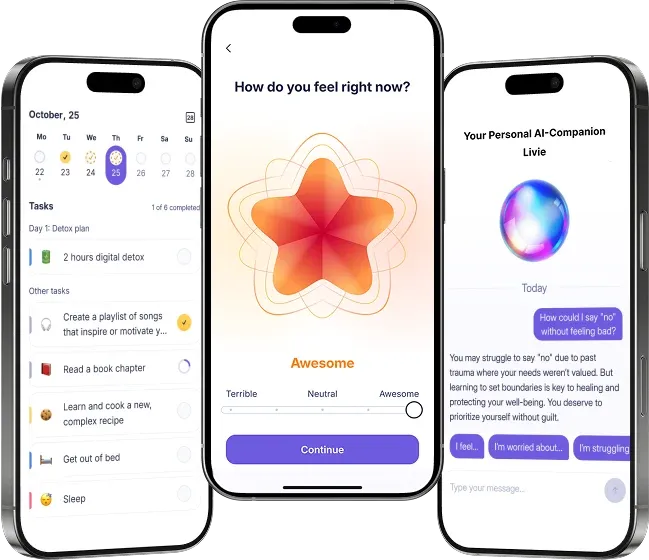
Liven is not primarily a journaling app; it's a holistic self-discovery solution. Journaling, however, is one of its core features, as this practice leads to better mental health.
When you open Liven's journal, you're guided into self-observability, noticing what you think and feel, and understanding why. Because the journal integrates with mood-tracking tools, you can see how your thoughts relate to emotional patterns over time.
Liven makes it easier to start by offering writing prompts and reflective questions. You might journal after logging your mood, or use simple icebreakers when you don’t know what to write. This kind of expressive writing can sometimes bring short-term discomfort, but it supports long-term emotional clarity and well-being.
What sets Liven apart is that journaling isn’t a standalone feature in this app. It works alongside to-do lists, mood insights, mental health tools, and Livie, the smart companion. Your entries become part of a system that helps you recognize patterns and track personal growth.
Livie is especially helpful when you don't feel like journaling on your own but actually want a supportive conversation where your needs and situation are understood.
For many users, this 360º approach to mental health makes Liven a valuable tool. Rather than just recording thoughts, the app encourages reflection, learning, and long-term personal growth.
💡 Tip: Journaling supports dopamine regulation by clearing mental clutter and creating clarity. If you want to learn more about regulating your dopamine levels, take Liven's quiz to get your personalized dopamine management plan!
Day One: Best for Classic, Multimedia Journal Entries
If you are looking for an app that is simply a digital journal, but rich with features and cross-platform support, then Day One is your best pick.
Day One’s initial version was released back in 2011 for Mac and iOS, and it digitized journaling for tech-savvy people. For over a decade, this app has stood out for its polished, feature-rich UX that goes well beyond simple text entries. The app ensures that personal context, like time, location, and weather, is automatically added to your entries. This makes your daily journal feel more like a living timeline than a simple personal diary.
Day One also supports importing data from other platforms, such as Spotify, YouTube, and social media. For organization, Day One offers a calendar view and a day feature, making it easy to revisit specific days and organize entries by date. As there is a lot of cross-platform data sharing here, your privacy is always maintained via end-to-end encryption.
One thing that sets Day One apart is its multimedia integration: you can add photos, audio recordings, and voice memos to entries, and premium users get unlimited photos and unlimited text entries.
Reflectly: Best for AI-Driven Guided Reflection
For people who freeze at the start of reflection, apps like Reflectly provide a conversational bridge. Reflectly uses features like AI-powered prompts and content suggestions to help you start journaling, so you don't get stuck in neutral gear.
Prompts can nudge you to dig into feelings and write out an honest reflection. This lets you celebrate small wins and notice patterns that might otherwise go unnoticed.
Reflectly’s strength lies in its guided prompts and AI features. Rather than leaving you to decide what to write, it structures your journaling sessions like a thoughtful conversation. This can make journaling feel more approachable and engaging, helping you maintain consistency and explore your thoughts in a guided way.
Journey: Best Daily Journal with Cross-Platform Accessibility
If your journaling life spans phones, tablets, laptops, and possibly desktop computers, Journey makes sure your thoughts travel with you. Its strength is in accessibility, with entries automatically synced across all possible platforms, including iOS, Android, Mac, Windows, Linux, and the web app. This means you’re never stuck with a fragmented journal. You can tap out reflections on the go and revisit them on a bigger screen later.
Journey also integrates mood tracking into your journal entries, offering a simple way to see trends without needing a separate app. Journey offers a multimedia journaling experience too, where you can upload photos, videos, and audio to enrich your journal entries. The app’s organization tools include a related photos feature that lets you quickly find visually similar images. Moreover, entries are neatly organized in a searchable timeline.
While Journey doesn’t push deep guided reflection the way some other apps do, its cross-platform availability and additional features make it a reliable choice for people who journal from multiple environments.
Diarly: Best Journaling App for Distraction-Free Writing
For some people, the distractions of too many bells and whistles can ruin the joy of reflection. If that sounds like you, try Diarly. This app strips back the noise and gives you a quiet, focused space where writing is the central experience. Many users appreciate how the interface simply fades into the background, letting their thoughts come forward without clutter or visual overload.
Diarly supports widgets for quick entry, quiet reminders to keep consistency, and syncing across Apple devices. The app offers a free version with basic features, allowing users to try out its core functionality, while advanced capabilities like device syncing are available only in the premium version.
But it remains true to its minimalist philosophy: your words matter, not the app’s interface.
Penzu: Best for Private, Secure Journaling
Some people journal about deeply personal experiences that they want protected above all else. Penzu is a diary app that meets this need with military-grade encryption and lock-screen protection, including biometric authentication methods such as Touch ID and Face ID on Apple devices.
Penzu does not push mood tracking or guided reflection heavily. It stays true to a classic journaling ethos where the space is yours and only yours. If your main concern is privacy and you want a secure outlet for thoughts without external lenses or analytics, Penzu fits that niche perfectly.
It gives you unlimited entries and automatic backups. Your words are always saved to the cloud as you keep typing on the go. Additionally, Penzu allows you to export your entries in various formats, such as PDF, plain text, and JSON, for sharing and printing.
Daylio: Best for Mood-Linked Micro Journaling
Not all journaling needs to be long prose. Some people find consistency through short, frequent check-ins that require minimal writing but still capture emotional patterns over time. Daylio is a journal and mood tracking app that supports quick, mood-linked reflections, combining fast logs with optional short notes.
Mood tracking can provide valuable insights that help you build better habits, share progress with a professional psychologist, or simply see how consistent you’ve been. Overall, it’s a great tool for spotting emotional and behavioral patterns.
Daylio’s visual charts, streaks, and habit-linked stats make such patterns visible in a way that encourages continued use. It’s not a deep reflection app on its own, but it’s effective for users who journal by capturing their mood and activities day by day.
Apple Journal: Digital Journaling for Apple Devices
Apple’s own Journal app exemplifies how digital journaling can assist reflection without effort. Designed only for Apple devices, it is a free app included with iOS and Mac, offering seamless integration within the Apple ecosystem.
It pulls contextual information, such as photos, music, workouts, and location data, to suggest prompts that feel personal and relevant. Compared to Apple Notes, a simple note-taking app, Journal focuses more on providing you with a private, secure space for your thoughts, leveraging your device’s security features to keep entries safe. Since it’s part of your device ecosystem, it encourages you to write when the moment feels right, and it even tracks your daily writing streak to help you stay consistent.
Pick the App That Fits Your Pace
Choosing a journaling app is just the first step. The real impact comes from making reflection a consistent practice and connecting it to your broader well-being. Apps like Liven give you a complete mental health suite that includes journaling features, so you can grow into your very best self.
To give you a quick summary of all the apps compared:
| App | Starting Price | Best For | What It Does |
|---|---|---|---|
| Liven | $7.99/week | Journaling with mood tracking and mental health support | Combines journaling, mood tracking, habits, CBT programs, and an AI companion |
| Day One | $49.99/year | Classic, multimedia journaling | Text, photos, audio, calendar view, and cross-platform syncing |
| Reflectly | $19.99/year | Guided AI journaling | AI prompts and conversational journaling to encourage reflection |
| Journey | $6.99/month | Journaling across devices with mood tracking | Cross-platform entries with multimedia, mood tracking, and a searchable timeline |
| Diarly | $2.00/month | Distraction-free writing | Minimalist interface with quiet reminders and Apple device syncing |
| Penzu | $4.99/month | Secure, private journaling | Encrypted journaling with cloud backup and exportable entries |
| Daylio | $4.99/month | Micro-journaling with mood tracking | Quick logs, visual charts, streaks, and habit-linked stats |
| Apple Journal | Free | Apple users want seamless journaling | Pulls contextual data, offers prompts, and tracks streaks within the Apple ecosystem |
If you're just getting started with journaling, don't forget to check out this beginner's guide on journaling ideas!
FAQ: Best Apps for Journaling
Do journaling apps help mental health?
Are digital journaling apps better than paper?
Which app is best for deep reflection?
Can I journal without writing long entries?
Are journaling apps secure?
How do I access additional features or past entries in journaling apps?
How can I get support or answers to other inquiries about journaling apps?